
Getting started
This tutorial will show you how to create and implement a basic UI and contracts in a dApp using Canton dAppBooster.
The tutorial's source code is available here.
Basic configuration and running the stack
Docker.
open -a Dockersudo systemctl start docker
# if using docker desktop:
# systemctl --user start docker-desktopBarebones (Canton LocalNet).
node scripts/localnet-config.mjs .canton-localnet # only needed the first time
cd .canton-localnet
pnpm exec canton-barebones start
Frontend.
# back to root directory
cd ..
# Defaults to http://localhost:3012
pnpm run app:dev
Wallet Gateway.
# Defaults to http://localhost:3030
pnpm run wallet-gateway
Create two parties
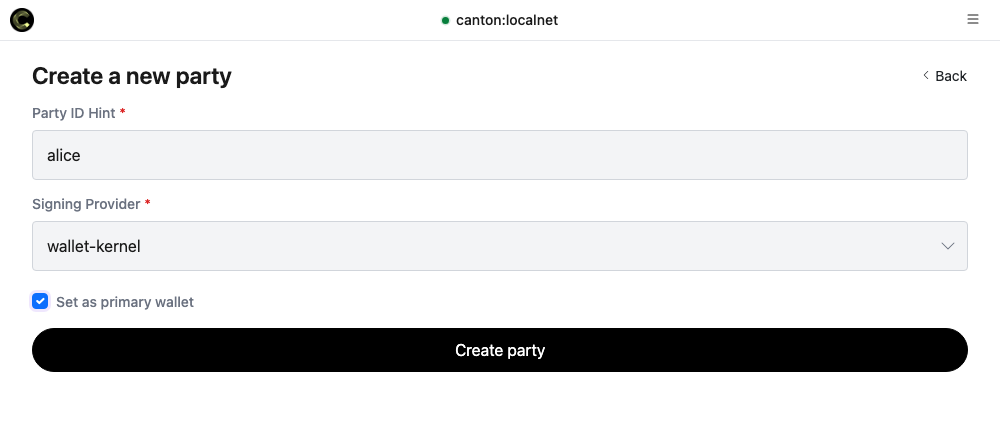
We'll need 2 parties for this tutorial. Open Wallet Gateway at http://localhost:3030 and enter the client secret unsafe when asked.
- Create a party called
alice, pick wallet-kernel as the signing provider, and tick Set as primary wallet. - Create a second party called
bobthe same way, without ticking primary.
Basic page shell
Replace dapp/frontend/src/App.tsx with the following: a header and an empty body.
import { type CantonConnectConfig, CantonConnectProvider } from '@bootnodedev/canton-connect'
import { ThemeProvider } from '@bootnodedev/canton-dappbooster'
import { RemoteAdapter } from '@canton-network/dapp-sdk'
import { WALLET_GATEWAY_URL } from '@/utils/config'

const connectConfig: CantonConnectConfig = {
  appName: 'Notes',
  additionalAdapters: [new RemoteAdapter({ name: 'Wallet Gateway', rpcUrl: WALLET_GATEWAY_URL })],
}

export const App = (): React.JSX.Element => (
  <ThemeProvider>
    <CantonConnectProvider config={connectConfig}>
      <div className="min-h-screen bg-bg text-fg">
        <header className="flex items-center justify-between border-b border-border px-6 py-4">
          <span className="text-lg font-semibold">Notes</span>
        </header>
        <main className="mx-auto max-w-2xl space-y-6 px-6 py-10">
          {/* App contents */}
        </main>
      </div>
    </CantonConnectProvider>
  </ThemeProvider>
)Add the connect button
Let's add WalletButton to the app so users can connect their wallet to the app.
Import it and drop it in the header.
import { WalletButton } from '@bootnodedev/canton-dappbooster/connect'<header className="flex items-center justify-between border-b border-border px-6 py-4">
<span className="text-lg font-semibold">Notes</span>
<WalletButton />
</header>Now you can connect to the app by pressing Connect wallet on the header. Choose Wallet Gateway from the options list, and enter unsafe as the client secret.
Add the Note contract
Remove the contents from the daml folder:
rm -rf dapp/daml/*Create dapp/daml/Note.daml.
module Note where

-- A line of text one party writes for another.
-- The author signs it, so only the author can create it.
-- The reader sees it, and is the only one who can acknowledge it.
template Note
  with
    author : Party
    reader : Party
    text : Text
  where
    signatory author
    observer reader

    -- Consuming, so acknowledging archives the note.
    choice Acknowledge : ()
      controller reader
      do pure ()
Create dapp/daml/daml.yaml.
sdk-version: 3.4.11
name: note
source: .
version: 1.0.0
dependencies:
  - daml-prim
  - daml-stdlib
Build the dar:
cd dapp/daml
dpm build
Go back to the project root and upload it:
# back to root directory
cd ../..
# mint backend token
export CANTON_BACKEND_TOKEN=$(node scripts/mint-token.mjs ledger-api-user | awk 'NR==1')
# upload
curl -X POST http://localhost:2975/v2/packages \
  -H "Authorization: Bearer $CANTON_BACKEND_TOKEN" \
  -H "Content-Type: application/octet-stream" \
--data-binary "@dapp/daml/.daml/dist/note-1.0.0.dar"Write a note
Create dapp/frontend/src/notes.ts with the commands and the reader for the ledger.
// A template id in `#package-name:Module:Template` form. The participant resolves it to whichever
// package id it holds, so a rebuild of the DAR needs no edit here.
export const NOTE_TEMPLATE_ID = '#note:Note:Note'

export type Note = {
  author: string
  contractId: string
  reader: string
  text: string
}

// JSON Ledger API v2 create command.
export const createNoteCommand = (author: string, reader: string, text: string) => ({
  CreateCommand: {
    templateId: NOTE_TEMPLATE_ID,
    createArguments: { author, reader, text },
  },
})

// JSON Ledger API v2 exercise command. Acknowledge takes no arguments.
export const acknowledgeCommand = (contractId: string) => ({
  ExerciseCommand: {
    choice: 'Acknowledge',
    choiceArgument: {},
    contractId,
    templateId: NOTE_TEMPLATE_ID,
  },
})

// The active-contracts read: every Note the party is a stakeholder of, at the given offset.
export const notesRequest = (partyId: string, offset: string | number) => ({
  requestMethod: 'post' as const,
  resource: '/v2/state/active-contracts',
  body: {
    filter: {
      filtersByParty: {
        [partyId]: {
          cumulative: [
            { identifierFilter: { TemplateFilter: { value: { templateId: NOTE_TEMPLATE_ID } } } },
          ],
        },
      },
    },
    activeAtOffset: offset,
    verbose: true,
  },
})

type AcsRow = {
  contractEntry?: {
    JsActiveContract?: {
      createdEvent?: {
        contractId?: string
        createArgument?: { author?: string; reader?: string; text?: string }
      }
    }
  }
}

export const toNotes = (rows: unknown): Note[] => {
  if (!Array.isArray(rows)) return []

  return (rows as AcsRow[]).flatMap((row) => {
    const created = row.contractEntry?.JsActiveContract?.createdEvent
    const { author, reader, text } = created?.createArgument ?? {}

    if (
      created?.contractId === undefined ||
      author === undefined ||
      reader === undefined ||
      text === undefined
    ) {
      return []
    }

    return [{ author, contractId: created.contractId, reader, text }]
  })
}
Create dapp/frontend/src/components/NoteForm.tsx.
import { useAccount, useExecute } from '@bootnodedev/canton-connect'
import { PartyIdInput } from '@bootnodedev/canton-dappbooster'
import { type FormEvent, useState } from 'react'
import { createNoteCommand } from '@/notes'

export const NoteForm = (): React.JSX.Element | null => {
  const { account } = useAccount()
  const { execute, error } = useExecute()
  const [reader, setReader] = useState('')
  const [text, setText] = useState('')

  if (account === undefined) {
    return null
  }

  const submit = (event: FormEvent): void => {
    event.preventDefault()
    // Sends the command through the wallet
    void execute({ commands: [createNoteCommand(account.partyId, reader, text)] })
    setText('')
  }

  return (
    <form className="space-y-3 rounded-lg border border-border p-4" onSubmit={submit}>
      <h2 className="font-semibold">Write a note</h2>
      <PartyIdInput onChange={setReader} placeholder="Reader party id" value={reader} />
      <input
        className="w-full rounded border border-border bg-surface px-3 py-2"
        onChange={(event) => setText(event.target.value)}
        placeholder="Your note"
        value={text}
      />
      <button
        className="rounded bg-primary px-4 py-2 text-primary-fg disabled:opacity-50"
        disabled={reader === '' || text === ''}
        type="submit"
      >
        Send
      </button>
      {error !== undefined && <p className="text-sm text-red-500">{error.message}</p>}
    </form>
  )
}
Add it to App.tsx.
import { NoteForm } from '@/components/NoteForm'<main className="mx-auto max-w-2xl space-y-6 px-6 py-10">
<NoteForm />
</main>Using Wallet Gateway, open Parties and use Copy party ID on bob's card.
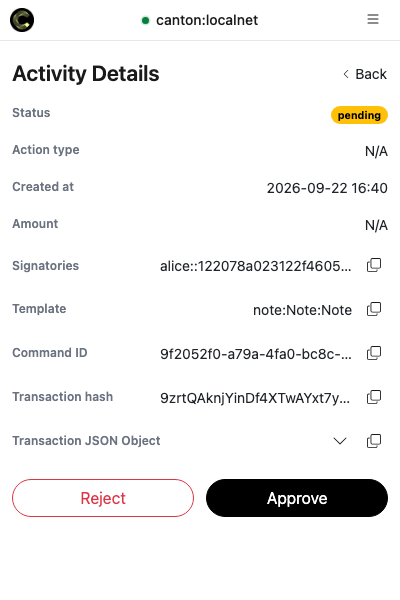
Paste bob's party id, write a line, and press Send. The wallet will open a window asking you to
approve the transaction: approve it.
List the notes and acknowledge them
Create dapp/frontend/src/useNotes.ts so we can read the active contracts through the wallet.
import { useAccount, useLedger } from '@bootnodedev/canton-connect'
import { useCallback, useEffect, useState } from 'react'
import { type Note, notesRequest, toNotes } from '@/notes'

const POLL_MS = 3000

/** Every Note the connected party can see, read again every few seconds. */
export const useNotes = (): { notes: Note[] } => {
  const { ledgerApi, isReady } = useLedger()
  const { account } = useAccount()
  const partyId = account?.partyId
  const [notes, setNotes] = useState<Note[]>([])

  const read = useCallback(async (): Promise<void> => {
    if (!isReady || partyId === undefined) {
      setNotes([])
      return
    }

    // A read is always taken at one offset, so the answer is a snapshot and not a moving target.
    const end = (await ledgerApi({ requestMethod: 'get', resource: '/v2/state/ledger-end' })) as {
      offset: string | number
    }

    setNotes(toNotes(await ledgerApi(notesRequest(partyId, end.offset))))
  }, [isReady, ledgerApi, partyId])

  // The wallet does not tell the page when a transaction lands, so the page asks.
  useEffect(() => {
    void read()
    const timer = setInterval(() => void read(), POLL_MS)
    return () => clearInterval(timer)
  }, [read])

  return { notes }
}
Create dapp/frontend/src/components/NoteList.tsx.
This is for the reader only, because only the reader can exercise the choice.
import { useAccount, useExecute } from '@bootnodedev/canton-connect'
import { partyHint } from '@bootnodedev/canton-dappbooster'
import { acknowledgeCommand } from '@/notes'
import { useNotes } from '@/useNotes'

export const NoteList = (): React.JSX.Element | null => {
  const { account } = useAccount()
  const { notes } = useNotes()
  const { execute } = useExecute()

  return account === undefined ? null : (
    <section className="space-y-3 rounded-lg border border-border p-4">
      <h2 className="font-semibold">Notes</h2>
      {notes.length === 0 ? (
        <p className="text-sm text-fg-muted">Nothing here yet.</p>
      ) : (
        <ul className="space-y-2">
          {notes.map((note) => (
            <li
              className="flex items-center justify-between gap-4 rounded border border-border p-3"
              key={note.contractId}
            >
              <div>
                <p>{note.text}</p>
                <p className="text-xs text-fg-muted">from {partyHint(note.author)}</p>
              </div>
              {note.reader === account.partyId && (
                <button
                  className="rounded bg-primary px-3 py-1 text-sm text-primary-fg"
                  onClick={() => void execute({ commands: [acknowledgeCommand(note.contractId)] })}
                  type="button"
                >
                  Acknowledge
                </button>
              )}
            </li>
          ))}
        </ul>
      )}
    </section>
  )
}
Add it under <NoteForm />.
import { NoteList } from '@/components/NoteList'<main className="mx-auto max-w-2xl space-y-6 px-6 py-10">
<NoteForm />
<NoteList />
</main>Read the note as bob
Go back to Wallet Gateway, open Parties, and press Set as primary on bob's card.
The dApp will switch to bob without reconnecting. You should be able to see the note bob received and an Acknowledge button.
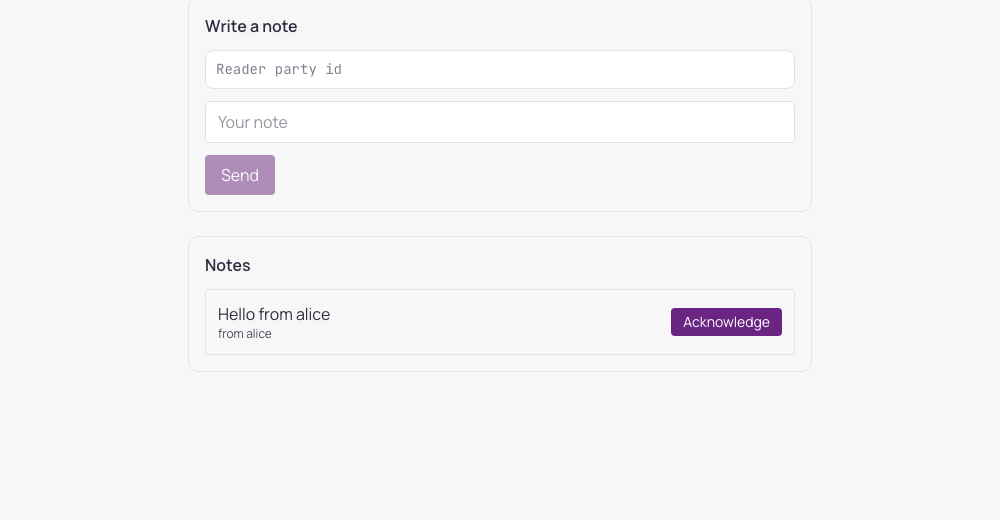
Press Acknowledge and approve it. The note will be archived and disappear from the list.